Open source · MIT · Bun CLI, MCP server, Agent Skills
From zero to “Submit for review” on Google Play and the App Store.
App records, in-app product prices, listings in every language, every questionnaire, privacy, icons, screenshots and previews. One config and your AI coding agent. storebound never presses Submit.
Needs Bun 1.1+ (and ffmpeg for icons, screenshots and video). Zero runtime dependencies. No account, no dashboard, no telemetry.
my-game
# one config, then dry runs first$ bunx storebound check
$ bunx storebound apple bundle --dry
$ bunx storebound play listing --dry
$ bunx storebound play products --dry
$ bunx storebound apple iap --dry
$ bunx storebound play data-safety --dry
$ bunx storebound apple appinfo --dry
$ bunx storebound icons --dry
$ bunx storebound shots render
$ bunx storebound validate
# what still blocks a submission,# per store, in fix orderSubmit for review · your click
2 stores, one config
17 Agent Skills
0 runtime dependencies
--dry on every write
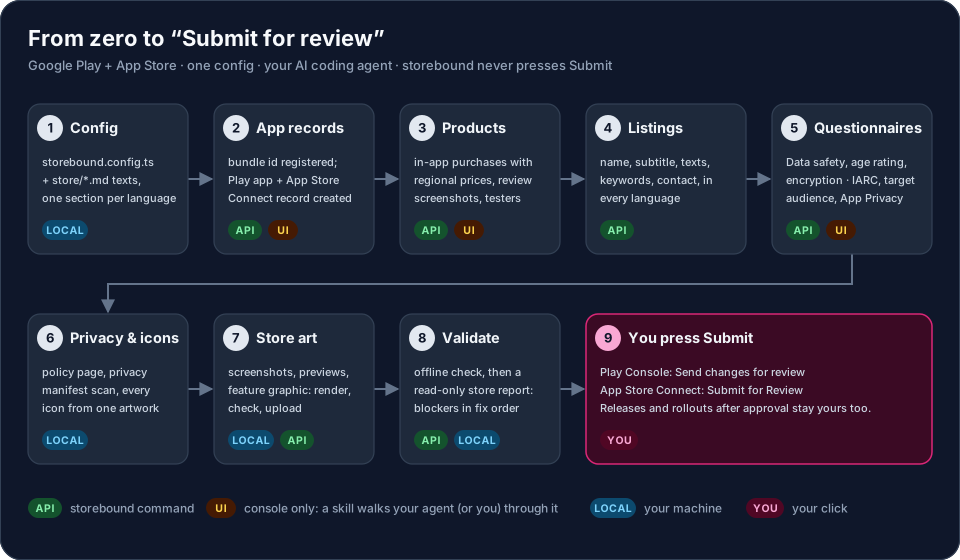
The journey
Everything a game needs before review, in order.
For each step: what storebound does through the store APIs or on your machine, what a skill walks your agent through where the stores have no public API, and what stays your own click.
API a storebound command (also an MCP tool)
LOCAL runs on your machine
UI a skill guides your agent, or you, through the console
YOU your own click
API or console, honestly
What it automates, what your agent walks through, what stays your click.
API
storebound does it
A CLI command, also an MCP tool. Every write has --dry.
Bundle id, builds on tracks, versions and build selection
Listings in every language, graphics, screenshots, app previews
In-app products with regional prices
Play Data safety (the whole form, from the config)
Apple age rating, categories, content rights, price and availability
Export compliance answer, App Review details
Phased release and staged rollout
UI
Skill + your agent walk through
No public API. The skill has the exact navigation and prepared answers; an agent with browser tools clicks while you watch, or you use it as a checklist.
Creating the App Store Connect app record and the Play app
Play App content: IARC content rating, target audience, ads, advertising ID, app access, government / financial / health / news
Play category, tags and countries
App Privacy labels and their Publish
TestFlight groups, adding first IAPs to the submission
Store experiments
YOU
Only you
Public, legal or money steps. The skills tell every agent to stop and hand these to you. None of them is an MCP tool.
Developer accounts, agreements, banking and tax
The answers to the questionnaires: they are your statements
Play: Send changes for review
App Store: Submit for Review
Releasing an approved version, resuming or completing a rollout or phased release
Questionnaires
Every store form, prepared. The ones with an API, filled.
init gives you prepared answers (store/declarations.md, store/app-privacy.md), written for a typical free-to-play game with ads and IAP. Change what does not match your game; the agent asks you whenever the code does not prove an answer.
Google PlayAPI
Data safety
The whole form from dataSafety in the config, imported as CSV through the API. The import replaces the form, so the config is the single truth.
play data-safety
Google PlayUI
IARC content rating
No public API. The store-declarations skill has the exact clicks and the prepared answers; your agent fills it in while you watch, or you copy them in.
store-declarations
Google PlayUI
Target audience and content
Walked through by the skill, together with ads, advertising ID, app access and the government, financial, health and news cards.
store-declarations
App StoreUI
App Privacy labels
From store/app-privacy.md, entered in App Store Connect, then Publish: saved labels that are not published are a classic blocker.
store-declarations
App StoreAPI
Age rating
The age rating declaration through the API, together with categories, content rights, Free price and availability.
apple appinfo
App StoreAPI
Export compliance
The answer comes from apple.usesNonExemptEncryption in your config, never guessed. When it is yes, the export-compliance skill covers the documentation.
apple encryption
validate cannot see the console-only forms, so the store-preflight skill lists them as a manual check before you submit.
Works with
Your AI coding agent. Or none.
Every route gives the agent the same skills and the same MCP tools. The skills are plain Markdown and the CLI is a normal command, so nothing here requires a particular tool.
Claude Code
OpenAI Codex
Cursor
GitHub Copilot
Gemini CLI
Windsurf
OpenCode
anything that reads AGENTS.md
Store art
Screenshots and previews, every size, every language.
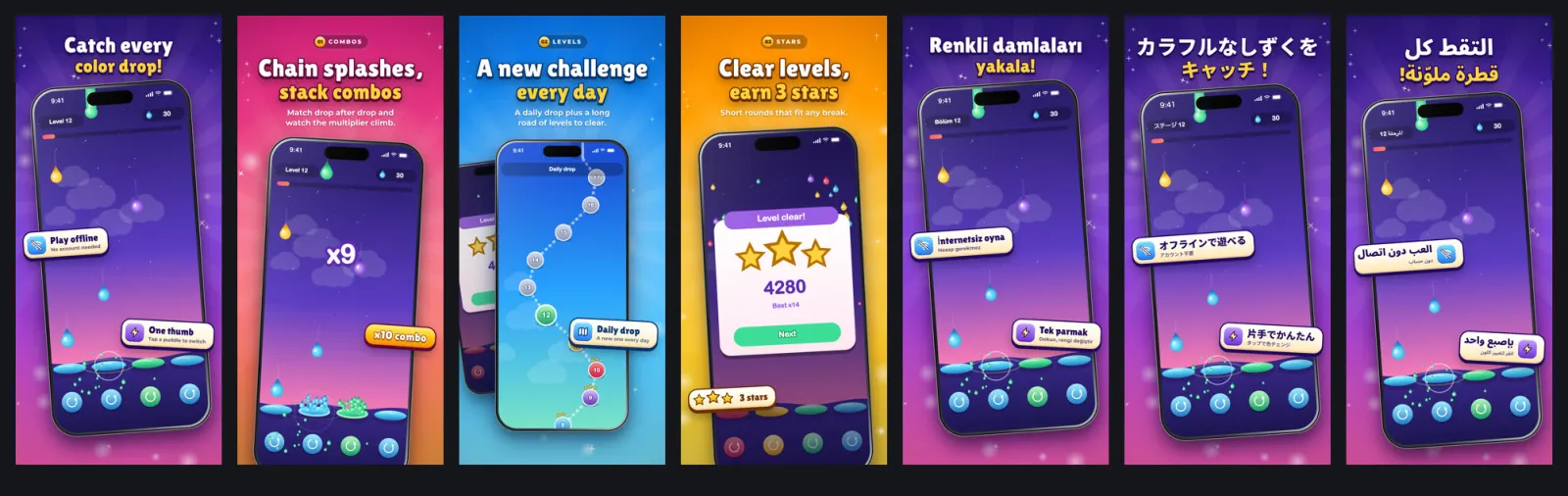
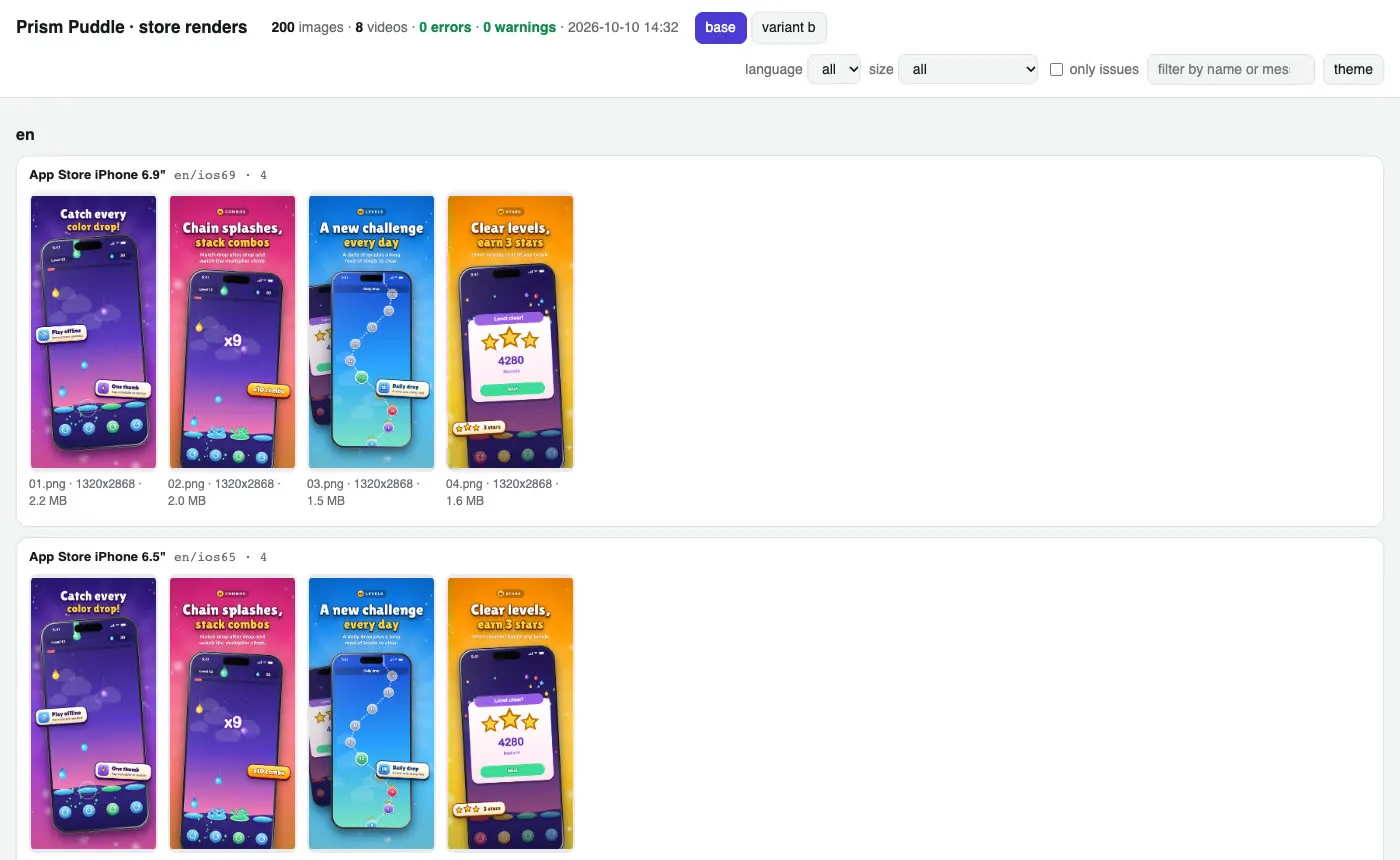
The step that takes longest by hand. Everything below was made by storebound itself from a tiny demo game (“Prism Puddle”, fictional, procedural art): raw frames from the web build, captions in 4 languages, every store size, a review gallery and an app preview video.
Four scenes in English, the hero scene in Turkish, Japanese and Arabic (right to left).
shots gallery: every language, size, scene and variant on one local page, store check issues outlined.App preview, cut by shots video.
Capture from a web build (Playwright), the iOS Simulator, an Android emulator or a folder of your own frames.
Render iPhone 6.9" and 6.5", 13" iPad, Play phone, 7" and 10" tablets, the 1024 x 500 feature graphic. 24-bit RGB, no alpha.
Check the store rules locally with shots check; validate repeats it next to the store state.
Fonts subset to exactly your characters, so Japanese, Chinese, Korean, Arabic and Hindi just work.
Quick start
Five minutes to a checked config.
1Add it to your game
cd my-game
bun add -d storebound playwright
bunx storebound init    # config, store/*.md, declarations, privacy policy
bunx storebound check   # offline: config, copy limits, Data safety, products, files
Credentials come from environment variables or the gitignored .storebound/credentials.json: a Play service account key and an App Store Connect API team key.
Skills, MCP server and GEMINI.md. Or bunx storebound install --agent gemini
Cursor
bunx storebound install --agent cursor
Skills in .agents/skills and .cursor/mcp.json. The repo's .cursor/rules/storebound.mdc is an agent-requested rule you can copy.
VS Code / GitHub Copilot
bunx storebound install --agent copilot
Skills in .github/skills and .vscode/mcp.json.
Windsurf (Devin Desktop)
bunx storebound install --agent windsurf
Skills in .agents/skills, MCP in your global mcp_config.json.
OpenCode
bunx storebound install --agent opencode
Skills in .opencode/skills and opencode.json.
Anything that reads AGENTS.md
Copy or link AGENTS.md (rules and skill index) into your project and use the CLI. For an MCP client install does not know: command bunx with args ["storebound", "mcp"].
install takes several agents at once (--agent codex,cursor), --dry to preview, and only touches its own storebound entry and skill folders. Re-running it is safe.
3Ask your agent
“take my game to Google Play and the App Store”
“fill in the store questionnaires”
“set up the in-app purchases on both stores”
“make store screenshots in 5 languages”
“is my app ready to submit”
The matching skill takes over. No AI tool? The skills are Markdown checklists you can read yourself.
Safety model
Built to be handed to an agent.
Credentials stay out of the repo
Env vars or the gitignored .storebound/credentials.json. Official store APIs only, with keys you create and can revoke, never your password.
Dry run everywhere
Every write command takes --dry; every MCP write tool has dry_run, default true.
Nothing public or irreversible through an agent
Submitting, releasing, production releases, resuming or completing a rollout, canceling a submission and deleting are not MCP tools. They stay terminal commands that ask first.
Idempotent writes
Re-running converges (MD5 checks for screenshots and previews, one Play edit per language), so a failed upload is fixed by running it again.
Careful with your devices
storebound shuts down only a simulator it booted itself, and never boots, wipes or reboots an Android emulator or device.